Slide # 1

Slide # 1

Far far away, behind the word mountains, far from the countries Vokalia and Consonantia, there live the blind texts Read More

Slide # 2

Slide # 2

Far far away, behind the word mountains, far from the countries Vokalia and Consonantia, there live the blind texts Read More

Slide # 3

Slide # 3

Far far away, behind the word mountains, far from the countries Vokalia and Consonantia, there live the blind texts Read More

Slide # 4

Slide # 4

Far far away, behind the word mountains, far from the countries Vokalia and Consonantia, there live the blind texts Read More

Slide # 5

Slide # 5

Far far away, behind the word mountains, far from the countries Vokalia and Consonantia, there live the blind texts Read More

Showing posts with label Windows වැඩ. Show all posts

Wednesday, January 23, 2013

Windows 7/ Vista/ XP Genuine කරගන්න..


Windows 8 Beta version එකත් ඇවිල්ලා තියෙන කාලෙක අහවල් දේකට Win 7/Vista/XP ගැන කියනවද මන්දා කියලා ඔයාලට හිතෙනවා ඇති නේද? ඒත් සමහරු ඉන්නවනේ කොයිතරම් අළුත් ඒවා ආවත් පරණ OS එක දාලා යන්න අකමැති අය. උදාහරණයක් විදියට Microsoft සමාගමේ මෙතෙක් බිහි වුණ හොඳම OS එක විදියට ගොඩක් දෙනා සලකන්නේ Windows XP. ඒකට විවිධ හේතු තියෙනවා. Win XP ගොඩක් stable සහ reliable වීම, ගොඩක් මෘදුකාංග සමඟ හොඳින් ක්‍රියාකිරීම වගේ ඒවා. Windows 2000, me වගෙ ඒතරම් සාර්ථක නොවුණ OS වලින් පස්සෙ කැපී පෙනෙන වෙනස්කම් සහිතව එළියට ආවේ Windows XP තමයි. ගොඩක් දෙනාට ඒකේ User interface එක එහෙම හොඳට හිතට අල්ලලා ගියා. ගොඩක් දෙනා වගේම මමත් Windows XP වලට ගොඩක් ආස වුණා. ඒත් නොමිලේ ම හම්බවුණ Windows 7 key එක අපරාදෙනෙ කියලා හිතලා තමයි මමත් සිම්පල් ප්ලෑන් එකකට මාරු වුණේ.

දැන් කියන්න යන්නෙ මේ Windows OS කොහොමද serial key එකක් නැතුව Genuine කරන්නෙ කියලයි. ගොඩක් දෙනා පාවිච්චි කරන්නෙ Crack නේ නේද? එහෙම වෙන්නත් හේතුවක් තියෙනවා ඉතින්. නියම Windows OS එකක් ලංකාවේ සාමාන්‍ය කෙනෙකුට තරමක් දරන්න අමාරු මිලකටනෙ තියෙන්නෙ. ඒ නිසා Crack ජනප්‍රියයි. හැබැයි මතක තියාගන්න ඕන දේ තමයි අපි කරන්නෙ නම් හොඳ වැඩක් නොවන විත්තිය. ජනප්‍රිය මෘදුකාංග වල කාර්යයන් ඒ විදියටම නොමිලේ ම කරලා දෙන විවෘත කේත මෘදුකාංග ඕනතරම් අන්තර්ජාලයේ තියෙනවා කියලා සමහරු දන්නෙත් නැහැනේ.

වැඩි කතන්දර ඕනෙ නැහැ. මේ ඇවිල්ලා තවත් ක්‍රැක් එකක් නම් නෙවෙයි. පොඩි මෘදුකාංගයක්. WAT Remover(Windows Activation Technology). සාමාන්‍යයෙන් ක්‍රැක් දැම්මම update කරන්න බැහැනේ. නමුත් මේ විදියෙදි පුළුවන්. ඒ වගේ ම සැරින් සැරෙ එන pop up notification එහෙමත් නවතිනවා. පහළ සබැඳියෙන් බාගත කරගන්නකෝ. පාවිච්චියට උපදෙස් මෙහෙමයි. දැන් තියෙන Windows OS සම්පූර්ණයෙන් ම format කරලා අළුතින් ම serial key එක දෙන්නෙ නැතුව Windows 7 install කරගන්න. ඊට පස්සේ Auto Windows Update එක Off කරන්න. දැන් RemoveWAT 2.2.5 setup file එක සාමාන්‍ය විදියට Run කරන්න. දැන් ඔයාගේ Windows 7 OS එක(32/64 bit) සම්පූර්ණයෙන් ම Genuine. දැන් Auto Windows Update එක On කරගන්න. මේ Windows 7 වලට විතරයි හොඳද...

Win Vista/XP වලටත් ඕනෙ නම් මෙතනින් බාගන්න. බාගත කරගැනීමේදි Download Manager මෘදුකාංග භාවිතා නොකර Slow Download Button for Free User Downloading ආකාරයට බාගත කරගන්න.

Windows 7 සඳහා

Win Vista/XP සඳහා

Monday, September 17, 2012

ඔබගේ ජංගම දුරකතනයෙන් පරිඝනකය නිදි කරවමුද?


ඔන්න යාලුවනේ මම මේ කියලා දෙන්න හදන්නේ අපේ පරිගණකය ජංගම දුරකතනයෙන් නිදිකරවල (shutdown) කරන හැටි
 

අවශ්‍ය කරන දේවල් 


i. ඊමේල් යැවිය හැකි ජංගම දුරකතනයක් (text 2 email පහසු කම හෝ තිබේනම් බාවිතා කල හැක )


ii.ඊමේල්ගිණුමක්


iii.පරිගණකයක්


iv.Outlook express මෘදුකාංගය


v. අන්තර්ජාල පහසුකම.


01. notepad එක ගන්න හැමෝම අරගෙන මේ ටික ටයිප් කරගන්න  c:\windows\system32\shutdown -s -f -t 00 ඊට පස්සේ  එක shutdown.bat කියලා Save කරගන්න


02. ඊට පස්සේ outlook express එක ගන්න එක ඔයල configured කරගෙන ඇති කියලා හිතෙනව ඔයාලගේ E-Mail එකට ගැලපෙන විදිහට.. දැන් outlook ඒකෙන් ඔයාලගේ ඊමේල් ගිණුම විනාඩියකට සැරයක් පරික්ෂා කරන විදිහට හදන්න (නොදන්නා අයට කියන්නම් එක කරන විදිහ tools >> Options >>mail setup >> send/recive >>  ඊට පස්සේ ඔයාට ඕනි විදිහකට එක වෙනස් කරගන්න)


03. ඊට පස්සේ outlook එකේ tools >> send/recive >> send/recive setings >> difine send/recive grup එක ගන්න එකේ Schedule an automatic send/receive every එකට හරිය දාගන්න


04. දැන් tools >> Rules and Alerts >> options >> Import Rules දැන් අපි හදාගත්තු අර .bat file එක තෝරාගන්න


05. දැන් ඔයාගේ ජංගම දුරකතනයෙන් ඔයාලගේ E-Mail ගිණුමට shutdown හරි  smsshutdown%%කියන Subject එක දාල ඊමේල් එකක් එවන්න  ඔයාලගේ පරිගණකය shutdown වේවි


*******02. පියවරේදී අපි දාපු විනාඩිය වෙනුවට ඕනෙම වෙලාවක් දාන්නන පුලුවන් ඒ දාන වෙලාව අනුව තමා ඊමේල් ඒකෙන් කොච්චර වෙලාවකට පස්සෙද shutdown වෙන්න යන වෙලාව තීරණය වෙන්නේ

උදා : විනාඩි 4.ක්‌ දැම්මොත් ඊමේල් ඒකෙන් විනාඩි 4.කට පස්සේ තමා පරිගණකය shutdown වෙන්නේ

හැමෝම ට්‍රයි කරලා බලන්න කිසිම ප්‍රශ්නයක් නැතුව වැඩ කරනවා

Tuesday, August 28, 2012

අම්මට සිරි !! START එක නැහැනේ VIRUS ගිහිල්ලා වත් ද?


හරි සරලව කියනවා නම් මම පොඩි මෘදුකාංගයක් දෙන්න යන්නේ.. චුටිම චුටි එකක්...එකෙන් වෙන්නෙ Start Button එක හංගන එක... එක පාර දැක්කම බය වෙනවා එක... " අම්මට සිරි , Start එක නැහැනේ Virus ගිහිල්ලා වත් ද" කියලා යාලුවො කියයි... හික් හික් 

 
හරි මුලින්ම කරන විදිය කියන්නම්.... මෘදුකාංගය Download කරගන්න.


දැන් ඔක Install කරලා Run කරන්න...දැන් එකට වෙච්චි දෙයක් නැහැ... 


Windows Key එක ගහලා Start Menu එක ගන්න පුලුවන් උනාට , Start Button එක නැති එක මාර අමුතුයි වගේ... ඉතින් එක තමා අද කියලා දෙන අමුත්ත...

මෙක නවත්ත ගන්නත් දැන ගන්න එපැයි... Bar දකුණු පැත්තෙ  ... Icons තියෙන තැන පිහියක Icon එකක් පෙන්න ඔනේ... එක Right Click එකක් දිලා Exit කරපු ගමන් ආයේ Start Button එක එනවා...

යාලුවා පොඩ්ඩක් එලියට ගිය ගමන් ඔක කරලා තිබ්බොත් කොහොමද... මම ඉතින් එවැනි අවස්ථාවක ප්‍රොයොජනයක් ගන්න පුලුවන් කියලයි කියන්නෙ... නැතිව කරන්න කියනවා නෙමෙ... හික් හික් එහෙනම් තවත් ලිපියකින් හමු වෙමු... 

Monday, August 20, 2012

තමන්ගේ පරිඝණකයේ තියන පහසුකම් පමණක් භාවිතා කර වේගය වැඩි කර ගනිමු


මේ ලිපියෙන් මම කියල දෙන්නේ නෝට් පෑඩ් එක පාවිච්චි කරල පරිඝණකයේ වේගවත් කරන විදිහක් ගැන.


පියවර 1
මුලින්ම අලුත් ටෙක්ස්ට් ඩොකියුමන්ට් එකක් ඩෙස්ටොප් එකේ හදා ගන්න.පහල තියෙන විදිහට ඉතුරු ටික කරන්න.


*මේක මේ විදිහටම ටයිප් කරන්න.


*මේ විදිහටම මම දීල තියන නමම දෙන්න.ඊට පස්සේ ඩෙස්ටොප් එකට සේව් කරන්න.මතකනෙ? ඩෙස්ටොප් එකට.


*හරි, දැන් එකම එක පාරක් මේකට ක්ලික් කරන්න.එක පාරයි.මාස පහකට විතර සැරයක් කලාම ඇති මේකෙන් වෙන්නේ ‍රැම් එක සුද්ද වෙන එක.

Comment එකක් දැමි‍‍මේ නැ‍තොත් මට ‍කේන්ති යයි ‍හො‍‍දේ..

පිසි එකට හොරෙන් රින්ගමුද? මෙන්න ක්‍රමේ..

දන්නා නොදන්නා හැමෝටම.......


  මට දැන ගන්න ලබුනු විදියට ඕගොල්ලොන්ට ලොකු ප්‍රොබ්ලම එකක්‌ තියෙනවලු පීසී පාස්‌වර්ඩ් අමතක වීම් ගැන...නැත්තම් පීසී පාස්‌වර්ඩ් හැක්‌ කිරීම් ගැන....මේක හොදද නරකද මම දන්නෙ නෑ ඒත් මේක කියලා දෙන්න ඕනේ කියලා මම හිතුවා...

‍‍                                 මේතන ‍කොටල බා ගන්න

වැදගත්:මේක සීඩී එකට රයිට්‌ කරලා පීසී එක රීස්‌ටාර්ට්‌ කරලා බූට්‌ කරන්න..මේ වැඩේ කරද්දී හොදින් කියවලා බලන්න.යම් වැරැද්දක්‌ උනොත් පීසී එක ආයිත් ෆෝමැට්‌ කරන්න වෙයි...

Wednesday, August 1, 2012

ලැප්ටොප් එකෙන් සරල wi-fi hot spot එකක් හදමු .

    අද  අපි හදාගන්න යන්නේ සරල   wi-fi  hot spot   එකක් ......මේකට මුලින්ම   අවශ්‍ය වෙනවා  wi-fi  පහසුකම තියෙන ලැප්ටොප් එකක් , මොකද ගොඩක් ඩෙස්ක්ටොප් පරිගණක  වල wi-fi  නැහැ.. ඩෙස්ක්ටොප්  වලටත්  නෙට්වර්ක් කාඩ් එකක්  සවිකරලා මේ  වැඩේ කරගන්න පුළුවන් .....හරි   මුලින්ම  control panel   එකට   යන්න.අමතක වුණා මුලින්   කියන්න .. අපි  wi-fi  hot spot එක හදන්න යන්නේ වින්ඩෝස් සෙවන්  වලදී
මුලින්ම  කිබෝර්ඩ්  එකේ ඇති wireless Network button එක මත ක්ලික් කර on කර ගන්න .
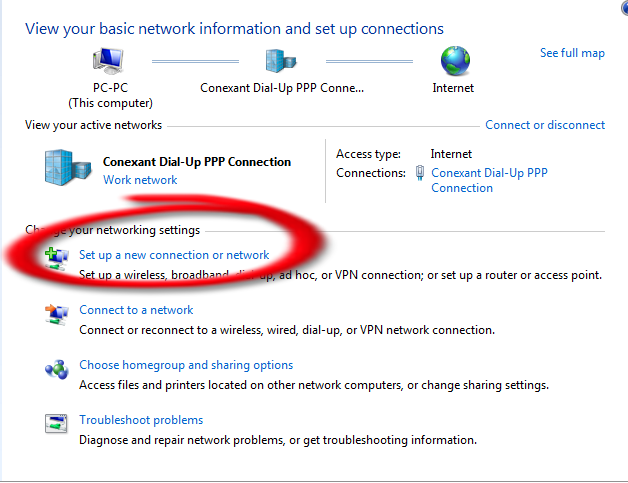
   control panel   වල ඇති  Network and Sharing center  මත ක්ලික් කරන්න.   එහි ඇති  set up a new   
    connection or Network  මත ක්ලික්   කරන්න.
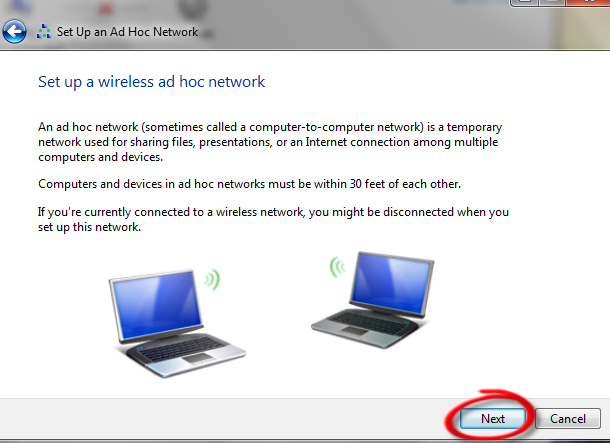
ඊට පසුව  එන මෙනුවෙන්   set up a wireless ad hoc ( computer-to-computer ) network    තෝරාගෙන  NEXT  මත ක්ලික්   කරන්න.
 ඊලගට පහත රූපය  පරිදි  එන මෙනුවට  NEXT  මත ක්ලික් කරන්න.  
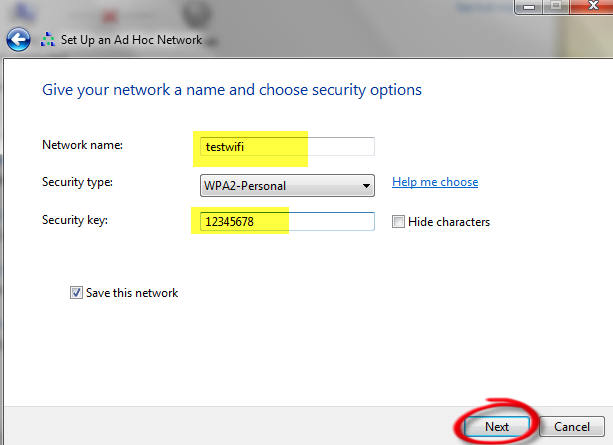
 දැන් පහත රූපයේ පරිදි  තමන් හදන   wi-fi  නෙට්වර්ක් එකේ නමත්  ,  සෙකුරිටි කී   වලට   තමන්  කැමති  පාස්වර්ඩ්   එකකුත්  දෙන්න  ,   security type එක WPA2-Personal    වශයෙන්   තබා next  මත ක්ලික්  කරන්න.
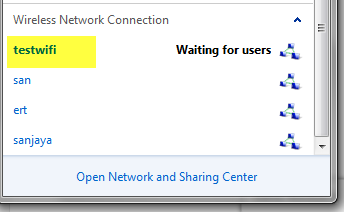
 දැන්  wi-fi  hot spot  එක හදල ඉවරයි ....  මෙන්න මේ වගේ  එකක්  වයර්ලස් කනෙක්ෂන්  වලට එකතු වෙලා   තියේවි 

    දැන් හදපු සරල wi-fi  hot spot එක  යොදාගෙන  යාළුවන් අතර  wi-fi   නෙට්වර්ක්  එකක්  හදාගන්න පුළුවන් .  මෙතනදී ඔවුන්ට ඔයාගේ  wi-fi   නෙට්වර්ක් එකට සම්බන්ද වීමට  පාස්වර්ඩ්  එක ඉල්ලනවා .. ඒ සදහා  සෙකුරිටි කී   වලට  දුන්න පාස්වර්ඩ්  එකම දෙන්න.   මෙහිදී  wi-fi නෙට්වර්ක් එක   අඩි 30 විතර ඇතුලත තමයි  හරියටම  වැඩ කරන්නේ. .. ඉතින් මේ පොස්ට් එක ඔයාලට වැදගත් වුණා නම් කොමෙන්ට්  එක්ක දාල යන්න අමතක කරන්න එපා..

Monday, July 30, 2012

::::::කවුද කැමති Xp එක 7 වගේ Transformation කර ගන්න::::::


ඔන්න මම අද දෙන්න කියලා අරගෙන ආවේ තවත් මෘදුකාන්ගයක් මේක Xp තියන අයට ගොඩක් වැදගත් වේවි කියලා මම හිතනවා.මේකෙන් තමන්ගේ Xp කොම්පිවුටර් එක වින්ඩෝස් 7 වගේ හදා ගන්නයි.එහෙනම් මේක අරගෙනම බලන්න කොහොමද කියලා හොදේ....


                                                       මේතනින් බා ගන්න


මතක තියාගන්න මේක ස්ථාපනය කරන්න කලින් ඔයාලගේ වයිරස් ගාඩ් Disable කරන්න.මෙය ඔබේ වගකීමෙන් කරන්න 

Monday, July 16, 2012


Internet Speed කරගන්න කැමතිද? එහේනන් එන්න..


අද මම ඔයාලට කියාන්න යන දේ සාමහරැ නන්  දන්නවා ඇති මන් දන්නැති කටිටියට කියලා දේන්නමි...

හරි ලින්ම පහතරැපයේ ආකාරයට  Run open කරගන්න..  ඉන් පසු gpedit.msc කියලා ටයිප් කර ගන්න

                                රැප සටහන් වල ආකාරයට කරන්න..                                                             

                                                                              1


2

3
Comment එකකුත් දාල‍ම අ‍යන්න‍කො...

Sunday, July 15, 2012


ඔන්න යාලුවනේ ඔයාලට ඇති වින්න  Run Commands  තියේනවා..


හැබැයි ‍මේවා windows xp වලට විතරයි වැ ඉස්සරහට windows 7 වලටත් දේන්න බලාපොරොත්තු විනවා හරි  එහේනන් අදට මම යනවා ඔබට ජය...


ü  Run Commands for XP
Program 
Run Command
Accessibility Controls 
access.cpl
Accessibility Wizard
accwiz
Add Hardware Wizard
hdwwiz.cpl
Add/Remove Programs
appwiz.cpl
Administrative Tools
control admintools
Adobe Acrobat ( if installed )
acrobat
Adobe Distiller ( if installed )
acrodist
Adobe ImageReady ( if installed )
imageready
Adobe Photoshop ( if installed )
photoshop
Automatic Updates
wuaucpl.cpl
Basic Media Player
mplay32
Bluetooth Transfer Wizard
fsquirt
Calculator
calc
Ccleaner ( if installed )
ccleaner
C: Drive
c:
Certificate Manager
cdrtmgr.msc
Character Map
charmap
Check Disk Utility
chkdsk
Clipboard Viewer
clipbrd
Command Prompt
cmd
Command Prompt
command
Component Services
dcomcnfg
Computer Management
compmgmt.msc
Compare Files
comp
Control Panel
control
Create a shared folder Wizard
shrpubw
Date and Time Properties
timedate.cpl
DDE Shares
ddeshare
Device Manager
devmgmt.msc
Direct X Control Panel ( if installed )
directx.cpl
Direct X Troubleshooter
dxdiag
Disk Cleanup Utility
cleanmgr
Disk Defragment
dfrg.msc
Disk Partition Manager
diskmgmt.msc
Display Properties
control desktop
Display Properties
desk.cpl
Display Properties (w/Appearance Tab Preselected )
control color
Dr. Watson System Troubleshooting Utility
drwtsn32
Driver Verifier Utility
verifier
Ethereal ( if installed ) 
ethereal
Event Viewer
eventvwr.msc
Files and Settings Transfer Tool
migwiz
File Signature Verification Tool
sigverif
Findfast
findfast.cpl
Firefox
firefox
Folders Properties
control folders
Fonts
fonts
Fonts Folder
fonts
Free Cell Card Game
freecell
Game Controllers
joy.cpl
Group Policy Editor ( xp pro )
gpedit.msc
Hearts Card Game
mshearts
Help and Support
helpctr
Hyperterminal
hypertrm
Hotline Client
hotlineclient
Iexpress Wizard
iexpress
Indexing Service
ciadv.msc
Internet Connection Wizard
icwonn1
Internet Properties
inetcpl.cpl
Internet Setup Wizard
inetwiz
IP Configuration (Display Connection Configuration)
ipconfig /all
IP Configuration (Display DNS Cache Contents)
ipconfig /displaydns
IP Configuration (Delete DNS Cache Contents)
ipconfig /flushdns
IP Configuration (Release All Connections)
ipconfig /release
IP Configuration (Renew All Connections)
ipconfig /renew
IP Configuration (Refreshes DHCP & Re-Registers DNS)
ipconfig /registerdns
IP Configuration (Display DHCP Class ID)
ipconfig /showclassid
IP Configuration (Modifies DHCP Class ID)
ipconfig /setclassid
Java Control Panel ( if installed )
jpicpl32.cpl
Java Control Panel ( if installed )
javaws
Keyboard Properties
control keyboard
Local Security Settings
secpol.msc
Local Users and Groups
lusrmgr.msc
Logs You Out of Windows
logoff
Malicious Software Removal Tool
mrt
Microsoft Access ( if installed )
access.cpl
Microsoft Chat
winchat
Microsoft Excel ( if installed )
excel
Microsoft Diskpart
diskpart
Microsoft Frontpage ( if installed )
frontpg
Microsoft Movie Maker
moviemk
Microsoft Management Console
mmc
Microsoft Narrator
narrator
Microsoft Paint
mspaint
Microsoft Powerpoint
powerpnt
Microsoft Word ( if installed )
winword
Microsoft Syncronization Tool
mobsync
Minesweeper Game
winmine
Mouse Properties
control mouse
Mouse Properties
main.cpl
MS-Dos Editor
edit
MS-Dos FTP
ftp
Nero ( if installed )
nero
Netmeeting
conf
Network Connections
control netconnections
Network Connections
ncpa.cpl
Network Setup Wizard
netsetup.cpl
Notepad
notepad
Nview Desktop Manager ( if installed )
nvtuicpl.cpl
Object Packager
packager
ODBC Data Source Administrator
odbccp32
ODBC Data Source Administrator
odbccp32.cpl
On Screen Keyboard
osk
Opens AC3 Filter ( if installed )
ac3filter.cpl
Outlook Express
msimn
Paint
pbrush
Password Properties
password.cpl
Performance Monitor
perfmon.msc
Performance Monitor
perfmon
Phone and Modem Options
telephon.cpl
Phone Dialer
dialer
Pinball Game
pinball
Power Configuration
powercfg.cpl
Printers and Faxes
control printers
Printers Folder
printers
Private Characters Editor
eudcedit
Quicktime ( if installed )
quicktime.cpl
Quicktime Player ( if installed )
quicktimeplayer
Real Player ( if installed ) 
realplay
Regional Settings
intl.cpl
Registry Editor
regedit
Registry Editor
regedit32
Remote Access Phonebook
rasphone
Remote Desktop
mstsc
Removable Storage
ntmsmgr.msc
Removable Storage Operator Requests
ntmsoprq.msc
Resultant Set of Policy ( xp pro )
rsop.msc
Scanners and Cameras
sticpl.cpl
Scheduled Tasks
control schedtasks
Security Center
wscui.cpl
Services
services.msc
Shared Folders
fsmgmt.msc
Sharing Session
rtcshare
Shuts Down Windows 
shutdown
Sounds Recorder
sndrec32
Sounds and Audio
mmsys.cpl
Spider Solitare Card Game
spider
SQL Client Configuration
clicongf
System Configuration Editor
sysedit
System Configuration Utility
msconfig
System File Checker Utility ( Scan Immediately )
sfc /scannow
System File Checker Utility ( Scan Once At Next Boot )
sfc /scanonce
System File Checker Utility ( Scan On Every Boot )
sfc /scanboot
System File Checker Utility ( Return to Default Settings)
sfc /revert
System File Checker Utility ( Purge File Cache )
sfc /purgecache
System File Checker Utility ( Set Cache Size to Size x )
sfc /cachesize=x
System Information
msinfo32
System Properties
sysdm.cpl
Task Manager
taskmgr
TCP Tester
tcptest
Telnet Client
telnet
Tweak UI ( if installed )
tweakui
User Account Management 
nusrmgr.cpl
Utility Manager
utilman
Volume Serial Number for C:
label
Volume Control
sndvol32
Windows Address Book
wab
Windows Address Book Import Utility
wabmig
Windows Backup Utility ( if installed )
ntbackup
Windows Explorer
explorer
Windows Firewall
firewall.cpl
Windows Installer Details
msiexec
Windows Magnifier
magnify
Windows Management Infrastructure
wmimgmt.msc
Windows Media Player
wmplayer
Windows Messenger
msnsgs
Windows Picture Import Wizard (Need camera connected)
wiaacmgr
Windows System Security Tool
syskey
Windows Script host settings
wscript
Widnows Update Launches
wupdmgr
Windows Version ( shows your windows version )
winver
Windows XP Tour Wizard
tourstart
Wordpad
write

යාලුවනේ මේ postඑක ගැන comment එකක් දන්න අමතක කරන්න එපා හොදේ...